2026 Kids Task Chore Chart Canva KDP
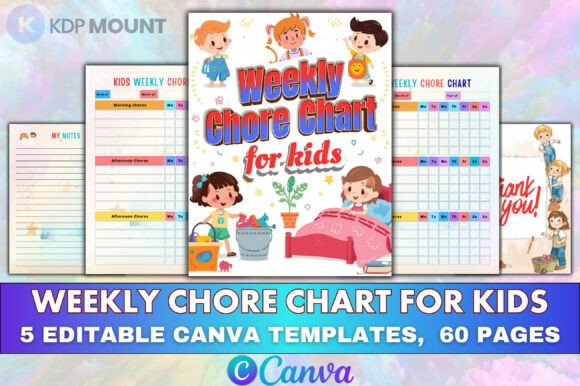
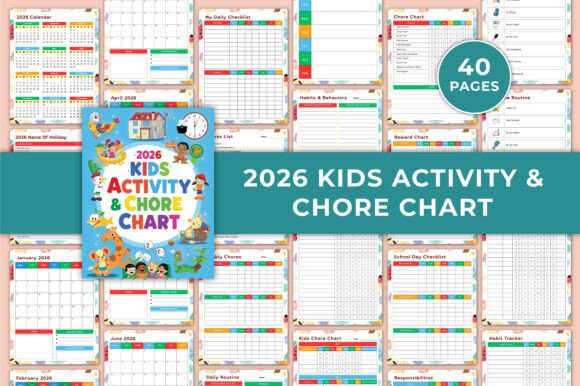
If you're building digital products for families—especially planners, homeschool tools, or behavior-support resources—the 2026 Kids Task Chore Chart Canva KDP is more than a printable: it’s a thoughtfully structured, production-ready design system. This isn’t a static PDF with locked text boxes. It’s a fully editable Canva template—40 pages of intentional layout, visual rhythm, and functional hierarchy—all built to scale across real household use cases.
The personality is warm but precise: rounded yet grounded, playful without sacrificing clarity. Think soft-edged icons paired with clean sans serif headings, consistent spacing that guides the eye from morning routine to bedtime checklist, and color zones that support scanning—not just decoration. There’s no visual noise. Every page serves a behavioral or organizational goal: tracking moods, assigning chores by time of day, logging allowance, or mapping school-day transitions. That intentionality makes it feel trustworthy to parents and accessible to kids aged 4–12.
Where This Template Fits in Real Creative Workflows
This isn’t just for print-at-home moms. Designers building KDP bundles on Amazon use the 2026 Kids Task Chore Chart Canva KDP as a foundation for premium planner collections—customizing colors and fonts to match brand palettes, then exporting high-res JPGs and print-ready PDFs. Educators adapting it for classroom behavior systems swap out “chore” labels for “responsibility goals” or “social-emotional check-ins.” Homeschool co-ops rebrand the reward chart as a “learning milestone tracker,” keeping the same underlying structure but shifting language and iconography.
For marketers launching parenting newsletters or subscription boxes, the template doubles as a lead magnet—edit one page to reflect your brand voice, add a subtle logo watermark, and deliver immediate value. Because it’s built in Canva, non-designers (like teachers or therapists) can modify it without hiring help. That flexibility expands its commercial utility far beyond typical “printable” listings.
Design Decisions That Drive Engagement
Readability here isn’t about font size alone—it’s about cognitive load reduction. The daily checklist uses bold task headers with light-weight sub-bullets, creating clear visual separation between “Brush teeth” and “Pack lunch.” The monthly planner avoids dense calendars; instead, it reserves space for notes and goals beside each week—encouraging reflection, not just scheduling. Even the mood tracker uses intuitive emoji-based scales rather than abstract sliders or text-heavy prompts.
Hierarchy works quietly but consistently: section titles are larger and bolder; routine steps appear in chronological order with gentle time indicators (“7:00 AM – Wake Up”); reward points are visually distinct with star icons and contrasting background bands. That consistency builds familiarity—kids learn where to look, parents scan faster, and teachers adapt it across students without retraining.
Practical Customization Guidance
Before editing, ask: Who’s using this—and what do they need to see first? A therapist might emphasize the behavior tracker and mood worksheet, so those pages get priority in the Canva presentation order. A small business selling chore kits might highlight the reward chart and allowance tracker—adding branded icons and adjusting point values to align with physical token systems.
Font pairing matters—but don’t overthink it. The base template uses friendly, legible sans serifs (think Montserrat or Nunito), which pair cleanly with handwritten-style accents for kid-drawn sections like bucket lists or notes. If you’re adding your own type, test contrast at 80% zoom: will a tired parent still read “After Dinner Routine” clearly at 8 PM? Avoid script fonts for core tasks—they slow down scanning. Reserve them for decorative headers only.
Check spacing rigorously. Canva’s drag-and-drop makes it easy to nudge elements—but inconsistent padding between rows in the weekly chore planner breaks rhythm. Use Canva’s alignment guides and duplicate pages to compare before/after edits. And always export two versions: one with bleed (for professional printing services) and one without (for home printers)—even though the original file specifies “no bleed,” your custom version may need adjustments depending on vendor specs.
Licensing, Output, and Commercial Reality
This is a commercial-use Canva template—meaning you can sell edited versions on KDP, Etsy, or your own site, as long as you follow Canva’s Content License Agreement (which permits derivative works for resale). No attribution required. But remember: the value isn’t in reselling the template as-is. It’s in how deeply you adapt it—changing color psychology (calming blues for anxiety-sensitive kids, energizing yellows for morning routines), localizing holidays, or translating key pages for bilingual households.
Output options matter for usability. The included high-quality JPG and PNG files let you drop visuals directly into social media posts or email campaigns. The 40-page PDF gives buyers flexibility—print only the pages they need, or bind the full set. US Letter sizing ensures compatibility with standard home printers, and the clean margins prevent critical content from getting cropped.
Finally, consider audience context. A busy single parent scrolling Amazon at midnight won’t read a 500-word description—they’ll glance at the cover image, check “editable in Canva,” and scan for “2026 calendar” and “reward chart.” Your listing (or client deliverable) should reflect that immediacy. Show the editable interface in action—not just final renders. Demonstrate how fast it is to change a font or recolor a section. That transparency builds trust far more than generic claims about “premium design.”
The 2026 Kids Task Chore Chart Canva KDP succeeds because it merges structure with adaptability. It doesn’t try to be everything—it focuses on doing core family coordination tasks well, then gets out of the way. That’s rare in planner templates. And that’s why it converts.