2026 Craft Planner Kdp Interior: A Fully Editable, Print-Ready Planning System for Makers and Creative Entrepreneurs
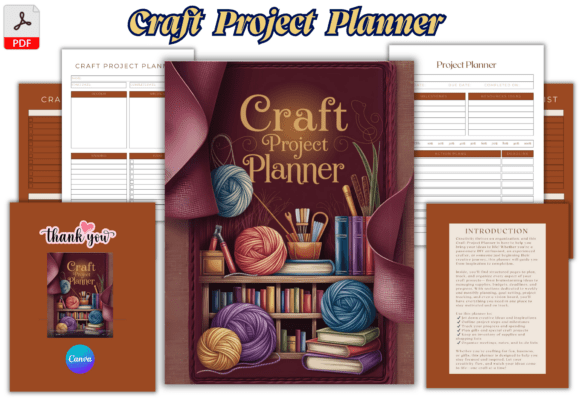
The 2026 Craft Planner Kdp Interior isn’t just another printable—it’s a purpose-built workflow foundation designed for people who turn ideas into tangible products. Whether you’re launching an Etsy shop, managing craft fairs, batching seasonal inventory, or balancing creative work with full-time employment, this interior is engineered to support execution—not just aspiration. It bridges the gap between inspiration and output by embedding structure into every stage of the craft business lifecycle: planning, sourcing, creating, tracking, selling, and reflecting.
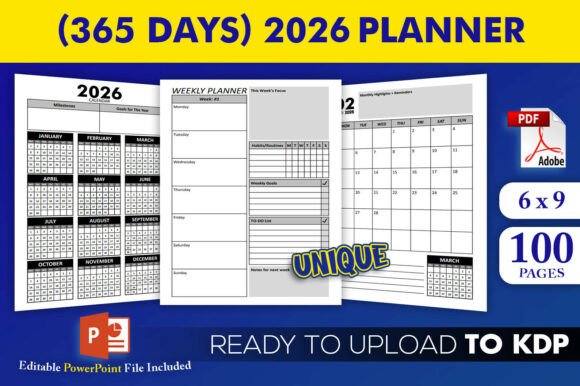
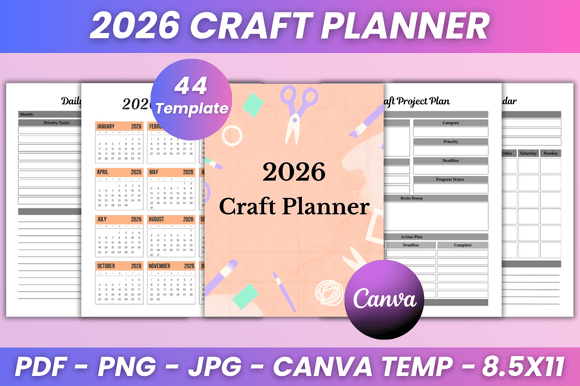
Each page serves a functional role in a real-world process. The Project Planner helps define scope before cutting fabric or ordering resin; the Budget Planner and Expense Tracker align spending with margins before materials arrive; the Supplies Inventory prevents over-ordering while flagging low-stock items mid-production. Unlike generic planners, this system anticipates how crafters actually move through time—weekly rhythm (Week at a Glance), monthly cycles (2026 Monthly Planner), and long-term vision (Yearly Plan)—all calibrated to the cadence of handmade production.
How the 2026 Craft Planner Kdp Interior Fits Into Your Workflow
You don’t need to adopt it all at once. Start where friction lives. If gift deadlines pile up each November, begin with the Gift Project Tracker and Craft Project Bucket List in late summer. Use those pages to map timelines backward: when to source supplies, when to batch, when to photograph, when to ship. That same tracker then feeds into the Monthly Orders and Online Purchase logs—creating traceability from idea to delivery.
During active creation, shift to the Daily Craft Plan and Project To-Do List. These aren’t passive checklists. They’re decision-support tools: pairing task timing with energy levels (e.g., detailed embroidery in morning focus windows, packing/shipping in afternoon blocks), syncing with your Weekly To-Do List to avoid context-switching overload. The Craft Supply Wish List stays live alongside your Shopping List, so new tool ideas get captured—and vetted against actual inventory and budget before purchase.
After launch or sale, use the Important Notes and Inspiration pages not for journaling, but for operational learning: “This dye lot varied across batches—note supplier batch # for next order,” or “Customers asked for larger hoop sizes—add to 2027 product roadmap.” That kind of reflection becomes reusable data, not lost insight.
Editing Flexibility Meets Real-World Usability
Every template in the 2026 Craft Planner Kdp Interior is fully editable on Canva—no design skills required. You’re not locked into preset fonts, colors, or layouts. Need larger checkboxes for quick scanning? Adjust. Prefer a bolder heading font for your Weekly Plan? Swap it. Want to embed photos of finished pieces beside their Craft Project Plan entries? Drop them in. This level of control matters because consistency in execution depends on clarity—and clarity depends on personal fit.
That editability also supports cross-tool integration. Paste supplier links directly into the Online Purchase section. Add QR codes linking to your Canva brand kit or inventory spreadsheet. Insert your logo into the Belongs To page for professional handoffs (e.g., sharing with a VA or co-maker). Because the Canva link is editable, updates propagate instantly—no version confusion, no re-downloading.
Once customized, export high-resolution files: print-ready 8.5 × 11 inch PDFs (CMYK-optimized for KDP), plus JPG and PNG variants for digital use—like embedding weekly plans into Notion dashboards or sharing supply lists via email. All 44 pages maintain clean, minimal design: ample white space, consistent spacing, legible type hierarchy. Nothing competes with your content. The structure supports your thinking—not the other way around.
Compatibility Across Platforms and Roles
This interior works whether you manage projects solo or collaborate. Freelance craft educators use the Monthly Planner and Weekly Plan to align class prep with material orders and student feedback cycles. Small business owners layer it over QuickBooks or Wave by mapping expense categories to the Expense Tracker and reconciling monthly. Bloggers and content creators tie the Inspiration and Ideas pages to editorial calendars—turning craft experiments into tutorials, reels, or newsletter features.
It’s also built for longevity. The 2026 Calendar spans January–December, but the Yearly Plan and Project Calendar pages let you map multi-year goals: launching a pattern line, building wholesale relationships, or upgrading studio equipment. Because the Canva file remains editable, you can duplicate pages, rename sections, or add custom tabs—evolving the planner as your process does.
Practical Implementation Tips for Consistent Use
- Start small, not perfect: Pick one recurring pain point—say, forgetting to reorder glue dots—and commit to using only the Supplies Inventory page for 30 days. Track refill dates, note lead times, adjust reorder thresholds. Once that habit sticks, layer in the Budget Planner.
- Batch your planning: Block 45 minutes on the last Friday of each month. Review the prior month’s Expense Tracker and Project Planner, update the 2026 Monthly Planner for the coming month, and populate the Shopping List based on upcoming projects.
- Use color intentionally: In Canva, assign consistent hues to status types—not aesthetics. Green = ordered, yellow = in stock but under threshold, red = urgent reorder. That visual logic survives printing and scanning.
- Protect your time: The Daily Craft Plan includes dedicated slots for “Admin” and “Creative Work”—not as vague categories, but timed blocks. Treat them like client meetings. If a project requires 90 minutes of uninterrupted stitching, schedule it, protect it, and track completion.
Long-term adoption hinges on reducing setup friction. That’s why the 2026 Craft Planner Kdp Interior delivers both editable flexibility and production-ready outputs. You invest time once—in customization—not every time you print or share. And because it’s built for KDP, the PDFs meet Amazon’s technical specs out of the box: bleed-free, embedded fonts, correct dimensions, CMYK-ready. No last-minute troubleshooting before upload.
This isn’t about adding more to your plate. It’s about replacing scattered notes, overlapping spreadsheets, and forgotten sticky notes with a single, coherent system—one that grows with your craft, adapts to your season, and reflects how you actually work.