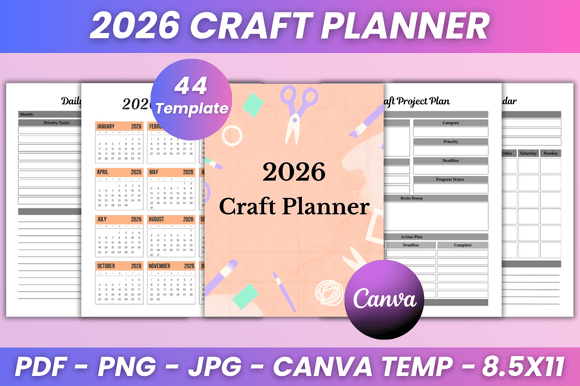
✨ Craft Project Planner 46-Pages: Your Realistic, Print-Ready Path to Creative Clarity
If you’ve ever stared at a half-finished embroidery hoop, a drawer full of unsorted beads, or a spreadsheet titled “Maybe Launch This?”—you’re not disorganized. You’re under-equipped. The ✨ Craft Project Planner 46-Pages isn’t another decorative PDF that gathers digital dust. It’s a functional, thoughtfully sequenced system built for how crafters *actually* work: in bursts of inspiration, waves of execution, and occasional reality checks about time, budget, and storage space.
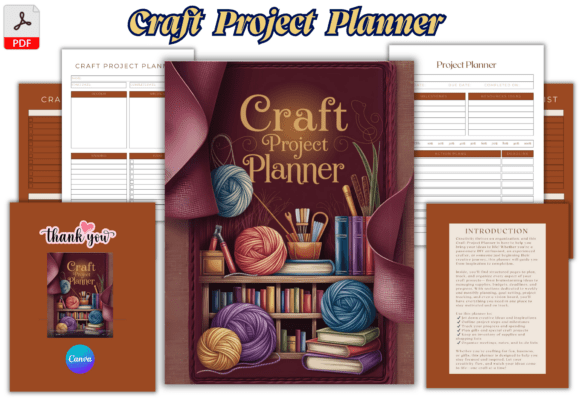
This 8.5 x 11-inch printable planner bridges the gap between creative impulse and tangible output. Whether you’re testing a new resin technique, prepping for your first Etsy launch, or managing commissions alongside full-time work, its 46 pages offer structure without rigidity—and the included Canva template means your branding stays consistent, not compromised.
What People Overlook (and Why It Slows Them Down)
Many crafters download a planner expecting instant productivity—only to abandon it after two weeks. That’s rarely about motivation. It’s usually about mismatched design and real-world use. Here’s where assumptions quietly derail progress:
- Assuming “printable” means “plug-and-play.” Not all PDFs are print-ready across devices. Some render fonts incorrectly on Mac Preview, shift margins when opened in Chrome, or lack bleed-safe borders—leading to clipped headers or misaligned grids. The ✨ Craft Project Planner 46-Pages is tested across major OS and PDF readers, with CMYK color profiles and 0.125″ bleed for professional printing.
- Treating idea capture and project tracking as the same thing. A blank sketch page won’t help you remember which yarn batch you used for Client A’s custom scarf—or whether you’ve ordered enough fabric for your holiday market booth. This planner separates creative ideation (dedicated sketch + mood board pages) from operational tracking (inventory logs, expense trackers, deadline calendars), so inspiration doesn’t drown out execution.
- Skipping the “This Book Belongs To” page—then losing clarity later. Sounds minor, but if you’re juggling personal projects, client work, and teaching materials, labeling isn’t vanity—it’s version control. Without clear ownership cues, notes blur across contexts. That “vision board” page? It works best when you know *whose* vision it reflects.
Why the Canva Template Changes Everything (If Used Right)
The editable Canva template isn’t just a “nice-to-have.” It solves three practical problems:
- Branding consistency for creative entrepreneurs. If you sell handmade goods, your planner should mirror your shop’s tone—whether that’s earthy linen textures or bold neon accents. Recoloring headers, swapping fonts, or adding your logo takes minutes in Canva—not hours in Illustrator.
- Accessibility customization. Need larger checkboxes? Higher-contrast text? A dyslexia-friendly font? The Canva file lets you adjust spacing, sizing, and contrast without compromising layout integrity.
- Team or classroom adaptation. Educators leading fiber arts workshops or small studios assigning collaborative builds can duplicate pages, add role-specific fields (“Materials Handler,” “Quality Check”), or embed safety reminders directly into workflow sections.
But here’s the catch: editing *too much* risks breaking functionality. Don’t delete the pre-formatted table rows in the budget tracker—even if you only track three expenses now. Those rows preserve calculation logic in printable versions. And avoid stretching graphics beyond their anchor points; Canva’s auto-resize can distort grid alignment critical for weekly planning.
Before You Download: 4 Checks That Prevent Regret
Not every planner fits every process. Ask yourself these before hitting “purchase”:
- Is your primary workflow analog, hybrid, or digital? If you live in Notion or Trello, a printable planner still works—but prioritize planners with clean, scannable layouts (like this one’s minimalist to-do columns and uncluttered calendar spreads) so you can easily transcribe key dates or inventory updates.
- Do you need legal or tax-ready documentation? While the expense tracker logs costs, it’s not an accounting tool. For business owners, treat it as a *first-draft log*—then export totals into QuickBooks or Wave. Never rely solely on handwritten entries for IRS documentation.
- How do you handle revisions? Sketches evolve. Designs pivot. The ✨ Craft Project Planner 46-Pages includes dedicated “Iteration Log” pages—not just “Project Notes”—so you can record why Version 2 failed, what supplier changed lead times, or which stitch test held up after washing. That’s where real learning lives.
- What’s your paper tolerance? This planner uses standard 8.5 x 11″ formatting—no odd sizes or binding requirements. But if you prefer spiral-bound durability, print double-sided on 24 lb. text weight and take it to a local print shop. Avoid ultra-thin copy paper; ink bleeds on watercolor sketches or heavy marker notes.
A Better Way to Start—Without Starting Over
Begin with one active project—not five. Open the “Project Planning” spread. Fill only the top third: goal, deadline, core materials. Skip the budget column until you’ve sourced quotes. Leave the vision board blank until you’ve sketched *one* rough thumbnail. Progress compounds when setup feels light, not laborious.
That weekly craft calendar? Use it for rhythm, not rigidity. Block “Swatch Testing Tuesdays” or “Admin Hours (No Creativity Allowed)” instead of “Work on Scarf.” Context matters more than clock time.
And if you’re sharing this planner with students, team members, or co-creators: print the “Craft Inventory Log” and “Shopping List” pages separately. Laminate them. Keep dry-erase markers nearby. Turn passive tracking into active collaboration.
The ✨ Craft Project Planner 46-Pages won’t eliminate creative uncertainty—but it does remove the friction of disorganization. When your supplies, schedule, and sketches live in aligned spaces, you stop choosing between making and managing. You do both, deliberately.