1000 Printable Kids Prompts: A Practical Workflow Asset for Educators, Creators, and Family-Focused Professionals
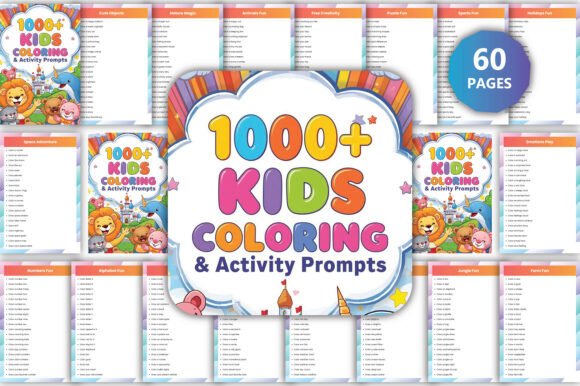
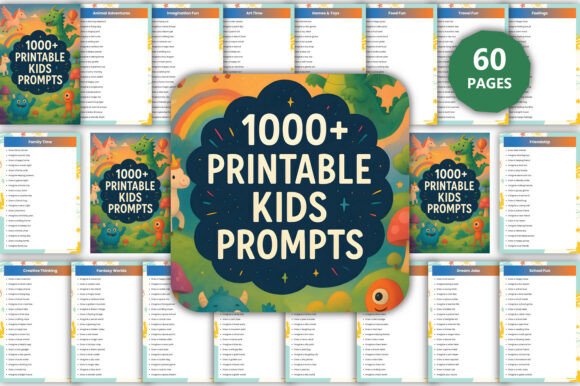
For educators designing lesson extensions, content creators building activity-based digital products, or small business owners developing printable subscription kits, 1000 Printable Kids Prompts functions as a high-leverage, modular resource—not just a static download. It’s built to integrate directly into existing workflows where consistency, customization, and output quality matter. Unlike generic prompt lists, this collection is structured around 42 thematic categories—from Science Fun and Problem Solving to Mindfulness, Culture, and Money Basics—each mapped to real-world developmental goals and curriculum-aligned outcomes.
How It Fits Into Your Process—Before, During, and After
Think of 1000 Printable Kids Prompts as a pre-vetted idea engine you deploy at multiple decision points:
- Before planning: Use the Story Starters or Fantasy Worlds sections to rapidly prototype narrative arcs for children’s books, classroom read-alouds, or YouTube script outlines—no brainstorming from scratch.
- During execution: Pull editable prompts from Feelings or Communication to scaffold social-emotional learning (SEL) activities mid-lesson, adjusting tone or complexity in real time via Canva.
- After delivery: Repurpose prompts from Art Time, Music Dance, or Building Ideas into follow-up extension packs, parent handouts, or newsletter content—extending value without reinventing content.
This isn’t about adding another tool to your stack. It’s about reducing friction between intention and implementation—whether you’re launching a new printable line on Etsy, preparing differentiated station rotations, or designing a summer camp curriculum.
Editing & Output: Designed for Real-World Usability
The interior files are fully editable using a free Canva account. No design software license required. Each prompt is layered cleanly—text boxes are ungrouped, fonts are web-safe and embedded, and color palettes use accessible contrast ratios. You can change wording, swap icons, adjust spacing, or insert your logo—all while preserving print-ready resolution.
You receive three output formats per page: high-resolution PDF (for professional printing), JPEG (for quick social sharing or email previews), and PNG with transparent background (ideal for overlaying onto branded templates or digital learning platforms). This flexibility means one edit propagates across all deliverables—no reformatting for different channels.
Workflow Integration Examples
Educators use the School Fun and Learning Skills prompts to build weekly “choice boards” in Google Slides. They import the editable PDF into Canva, replace placeholder text with grade-level vocabulary, then export as PNGs to embed directly into LMS announcements or Seesaw activities.
Content creators batch-edit prompts from Hero Stories, Dream Jobs, and Leadership to align with seasonal themes—e.g., pairing Community and Helpers prompts for a “Kindness Week” campaign. They export JPEGs for Instagram carousels and PDFs for gated lead magnets—both generated from the same Canva file.
Small business owners treating printables as inventory use the Family Time, Travel Fun, and Food Fun categories to create themed bundles. They rename files consistently (e.g., “1000-Printable-Kids-Prompts_Travel-Fun_v2.pdf”), store them in organized cloud folders, and tag each with metadata like “age-range: 5–10”, “use-case: road trip”, “format: editable” — enabling fast retrieval during product launches or customer support requests.
Quality Control & Long-Term Consistency
The set includes two unique page file versions—one optimized for black-and-white printing (minimal ink, clear typography), the other in full color (vibrant but CMYK-safe for commercial printers). Both maintain identical prompt counts and category coverage. This dual-format approach eliminates guesswork when scaling production: you know exactly which file to send to your POD partner versus which to use for in-house laminated cards.
Because every prompt is individually editable, version control becomes manageable. Save dated Canva versions (“v2024-06_Science-Fun_Updated”) and keep a changelog spreadsheet tracking edits—e.g., “replaced ‘robot’ with ‘AI helper’ in Prompt #872 to reflect current tech literacy standards.” That discipline ensures your outputs stay aligned with evolving pedagogical guidelines or brand voice requirements.
Compatibility With Your Existing Tools
1000 Printable Kids Prompts works natively with tools you already use:
- Google Workspace: Export edited pages as PDFs and attach directly to Classroom assignments or Docs-based lesson plans.
- Trello/Notion: Upload PNG thumbnails to project boards as “prompt cards” linked to specific learning objectives or client briefs.
- Canva Brand Kit: Apply your brand colors and fonts once—then apply globally across all prompt pages with Canva’s “Replace Fonts” and “Recolor” tools.
- PDF editors (like Adobe Acrobat or PDFescape): Use the high-res PDFs for non-design edits—adding checkboxes, answer lines, or QR codes linking to video explanations.
No plugin, API, or conversion step is needed. The files behave predictably because they were built with cross-platform compatibility in mind—not as locked assets, but as working components.
Practical Implementation Tips
Start small. Pick one category that solves an immediate pain point—say, Feelings for morning check-ins or Puzzles for early-finisher tasks—and test it with one class, one client, or one product variant. Track usage: How many prompts did you actually deploy? Which ones sparked the most engagement? Where did you need to adapt wording or add visuals?
Organize your edited files by workflow stage, not just theme: “Drafted”, “Client-Approved”, “Print-Ready”, “Archive”. This mirrors how professionals manage any reusable asset—treat prompts like stock photography or template libraries, not disposable worksheets.
Use the Notes section included in the download to document your adaptations—what age group you targeted, which standard it supports (e.g., CASEL SEL Core Competency: Self-Awareness), or how it integrates with a specific assessment rubric. That metadata turns a prompt into an evidence-backed teaching tool.
Why This Goes Beyond “Just Another Printable”
Most prompt collections stop at inspiration. 1000 Printable Kids Prompts bridges inspiration to execution by prioritizing structure, fidelity, and interoperability. The 42 categories aren’t arbitrary—they map to widely adopted frameworks like the CASEL competencies, Head Start Early Learning Outcomes Framework, and ISTE Standards. That alignment reduces your research overhead and strengthens credibility with schools, publishers, or grant reviewers.
It also anticipates scalability. Whether you’re producing five custom prompts for a single workshop or licensing hundreds for a global edtech platform, the underlying architecture supports both. There’s no paywall for advanced features, no hidden layers, and no proprietary format lock-in—just clean, editable, production-ready assets designed to move with your process, not slow it down.
If your work involves guiding children’s thinking—through teaching, storytelling, product design, or community programming—1000 Printable Kids Prompts isn’t supplemental. It’s infrastructure. Edit it once. Use it across projects. Update it as needs evolve. And always ship output that reflects your expertise—not just someone else’s template.