ADHD Dopamine Menu Planner Template
Executive dysfunction isn’t a character flaw—it’s a neurobiological reality for many adults with ADHD. It shows up as difficulty starting tasks, sustaining attention, shifting focus, or recovering from overwhelm. When dopamine regulation is inconsistent, the brain seeks quick, low-effort stimulation: doom scrolling, rewatching old shows, refreshing email tabs, or toggling between ten browser windows. That’s not laziness. It’s your nervous system trying—and failing—to self-regulate.
The ADHD Dopamine Menu Planner Template addresses this at the source: by replacing reactive, dopamine-depleting habits with intentional, pre-vetted alternatives. It’s not another to-do list. It’s a decision-simplifying framework rooted in behavioral neuroscience—designed to reduce cognitive load when motivation is lowest.
How It Fits Into Real Workflows
This template integrates into your existing systems—not as an extra step, but as a friction-reducing layer. Think of it like a “decision buffer.” Before you reach for your phone during a work break, before you stall on a client proposal, or before you shut down after back-to-back Zoom calls, the planner gives you a clear, visual set of options calibrated to your energy, time, and capacity *in that moment*.
For professionals managing asynchronous communication, it helps prevent the 3 p.m. scroll spiral that derails afternoon deep work. For educators designing lesson plans, it supports sustainable pacing—swapping “I’ll just check one more thing” for a 90-second grounding side activity. For freelancers juggling deadlines and admin, it turns vague self-care intentions (“I should rest”) into concrete, executable choices (“5-minute stretch + cold water”).
Structure That Mirrors How Your Brain Works
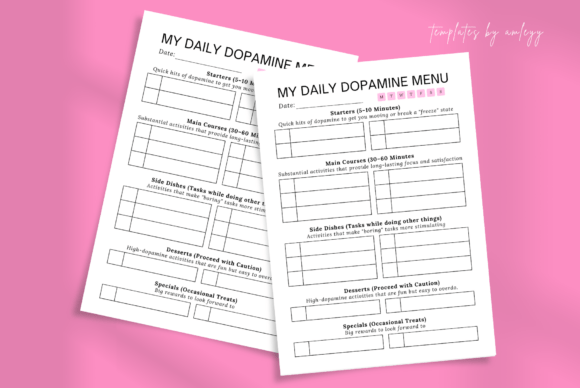
The ADHD Dopamine Menu Planner Template uses food-based categories—not as gimmicks, but as cognitive anchors:
- Starters: Low-effort, high-impact actions (e.g., splash face with water, open window, hum a tune). Used when energy is near zero or attention is fragmented.
- Mains: Moderate-effort, medium-duration activities (e.g., 15-minute walk, voice-note brainstorm, sketching ideas). Ideal for resetting focus mid-task or transitioning between work modes.
- Sides: Optional, supportive actions (e.g., hydrate, adjust lighting, tidy desk corner). Paired with Mains—or used solo to maintain momentum without overloading.
- Desserts: Higher-effort, longer-reward activities (e.g., call a friend, draft a blog outline, organize a folder). Reserved for when executive function is stable and sustained effort is possible.
This structure works because it mirrors how neurodivergent brains process choice: not as abstract options, but as contextual, sensory, and time-bound cues. You’re not choosing “what to do”—you’re matching your current state to a pre-approved slot.
Integration With Tools You Already Use
The ADHD Dopamine Menu Planner Template isn’t meant to replace your calendar, task manager, or note-taking app. It complements them.
Pair it with Google Calendar by scheduling a “Starter + Main” combo before every meeting block—reducing transition fatigue. Embed it in Notion as a toggle section next to your daily agenda. Use it alongside time-tracking tools like Toggl Track: if you notice recurring 45-minute scroll loops, review your Dessert column and ask, “What’s missing here? Is this activity actually rewarding—or just familiar?”
It also interfaces well with habit-tracking methods. If you use habit stacking (e.g., “After I close my laptop, I’ll do one Starter”), the planner provides the exact action—no mental negotiation required. And because it’s built in Canva, you can export PNGs to pin to your desktop, embed in Slack status updates, or drop into a digital whiteboard during team wellness check-ins.
Practical Implementation Tips
Start small, not perfect. Don’t try to fill all four sections on Day One. Pick two Starters and one Main that feel genuinely accessible—even if they seem “too simple.” A Starter isn’t about achievement; it’s about interrupting autopilot.
Test for reward—not just effort. An activity only belongs on your menu if it reliably lifts your mood *or* restores focus within 2–5 minutes. If “read an article” leaves you more drained, move it out—even if it sounds productive.
Rotate seasonally. Your dopamine needs shift. What worked in January may not land in August. Revisit your menu every 4–6 weeks—not to overhaul, but to prune, add, or rename based on real-world use. Keep a running log in a notes app: “Tried ‘dance to one song’ → felt energized but disoriented. Swapped for ‘stretch + deep breaths’ → calmer, clearer.”
Anchor it physically or digitally. Print one copy and keep it beside your workstation. Or save the Canva link as a bookmark labeled “Menu — Tap When Stuck.” The goal is zero friction between impulse and action.
Why the Canva Format Matters
This isn’t a static PDF you print and forget. The ADHD Dopamine Menu Planner Template is delivered as an editable Canva file—because customization is part of the therapeutic process. Changing colors to match your calm palette, swapping icons for ones that resonate, or rearranging sections to reflect your personal priority order isn’t decoration. It’s embodiment.
Canva’s interface lowers the barrier to iteration: no design skills needed, no software to install. You can adapt it for different contexts—a version for home office use, another for travel, a simplified one for days with high sensory load. That flexibility supports long-term consistency far better than a rigid, one-size-fits-all system.
Building Consistency Without Burnout
Many planning tools fail because they demand constant upkeep. This one succeeds by design: it asks for effort only during setup—not during execution. Once your menu is live, maintenance takes seconds: drag-and-drop a new option in Canva, delete what no longer serves you, or duplicate a section for a new project phase.
Consistency grows from usability—not willpower. If your planner lives on your phone’s home screen, you’ll use it. If it’s buried in a folder named “Productivity Stuff,” you won’t. That’s why the instant Canva access link matters: it removes setup latency. No unzipping, no font installs, no troubleshooting—just click, edit, use.
Who Benefits Beyond ADHD Diagnoses
While designed with neurodivergent cognition in mind, the ADHD Dopamine Menu Planner Template supports anyone navigating chronic stress, burnout recovery, postpartum adjustment, or high-cognitive-load roles. Remote workers report fewer “afternoon crashes.” Educators use it to model self-regulation for students. Entrepreneurs integrate it into onboarding—giving new hires a tangible tool for sustainable pace-setting.
Its power lies in specificity. It doesn’t say “take a break.” It says, “If your eyes are dry and your thoughts feel sticky, try Starter #2: 3 slow breaths + sip cold water.” That level of clarity transforms intention into action—without relying on motivation you may not have.
Final Thought: Planning Is Prevention
You don’t need more discipline. You need better infrastructure. The ADHD Dopamine Menu Planner Template is infrastructure—not inspiration. It’s the difference between waiting for focus to arrive and building conditions where focus can emerge. It won’t eliminate executive dysfunction—but it will shrink its footprint in your daily workflow, one intentional, dopamine-aligned choice at a time.