Floral Apricot Book Cover Template KDP
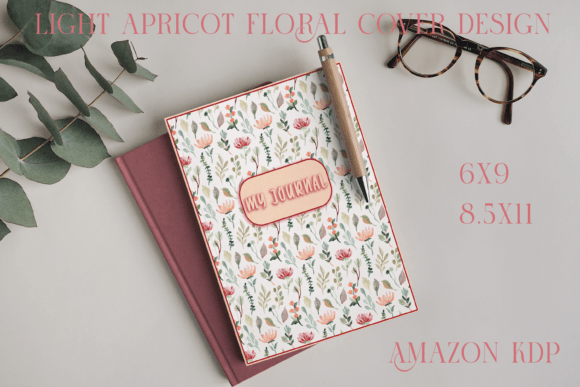
Creating a book or journal that stands out—without spending hours on design or hundreds on a custom illustrator—is no longer a compromise. It’s a realistic, repeatable part of modern creative workflow. The Floral Apricot Book Cover Template KDP reflects this shift: a thoughtfully designed, production-ready resource built for clarity, flexibility, and quiet elegance—not flashiness.
Why a Soft Apricot Floral Design Fits Today’s Creative Needs
Color psychology and visual culture have quietly evolved over the past five years. Consumers—especially in wellness, journaling, education, and indie publishing—are responding less to bold saturation and more to grounded, breathable palettes. Light apricot sits at the intersection of warmth and calm: it reads as approachable but not childish, feminine but not stereotyped, vintage-inspired but unmistakably contemporary. Paired with delicate watercolor florals, it avoids cliché by leaning into subtlety—no heavy outlines, no symmetrical arrangements, no overwhelming density. Instead, it offers rhythm, air, and gentle texture.
This isn’t just aesthetic preference—it’s functional alignment. Readers browsing Amazon KDP or Etsy for journals and planners increasingly use visual filters: “soft,” “minimal,” “aesthetic,” “calming.” Covers that signal emotional resonance in under two seconds gain measurable advantage. A floral apricot cover doesn’t shout; it invites. And in crowded digital thumbnails, that invitation often translates to higher click-through and lower bounce rates.
How This Template Meets Real Publishing Workflows
Self-publishing has matured. It’s no longer about uploading *any* cover—it’s about uploading a cover that passes KDP’s technical checks *and* communicates intentionality to readers. The Floral Apricot Book Cover Template KDP is built around those dual requirements.
It includes both 6×9 and 8.5×11 print sizes—two of the most widely used dimensions for paperbacks and larger-format journals—and each comes with full bleed support. That means no awkward white edges when trimmed, no guesswork about safe zones for text placement, and no last-minute resizing panic before upload. The PSD files allow precise layer-based editing (swap fonts, adjust title position, mute floral intensity), while the PDF and PNG versions offer direct compatibility: one for high-fidelity printing, the other for quick KDP uploads when time is tight.
For professionals managing multiple clients—or creators launching a series—the value compounds. Imagine building a cohesive brand across three planner titles: same base template, different title treatments and accent colors. Or an educator designing printable classroom journals—using the 8.5×11 version for spiral-bound student handouts, then repurposing the 6×9 variant for a companion paperback guide sold on Amazon. No redesign needed. Just consistent, intentional adaptation.
From Desktop to Shelf—Without Compromise
One of the most overlooked aspects of digital templates is output flexibility. This isn’t a “digital-only” asset. You can print it at home on premium matte paper for small-batch handmade notebooks. You can send the PDF to a local print shop for foil-stamped hardcover journals. Or you can upload the PNG directly to KDP—provided you select BLEED and confirm your trim size matches the file (6”x9” or 8.5”x11”). That specificity matters: KDP rejects covers that don’t meet exact bleed and resolution standards, and this template eliminates that risk through pre-tested dimensions and 300 DPI readiness.
Real-world example: A freelance life coach launched a quarterly reflection journal using the 8.5×11 version. She edited the PSD to add her logo in the top corner, adjusted the title font to match her website, and exported a print-ready PDF for her local binder. Simultaneously, she uploaded the matching 6×9 PNG to KDP for the paperback edition—same visual language, two distinct formats, zero design overhead.
What Changes When You Prioritize Intentional Simplicity
There’s a quiet trend gaining traction among creators: moving away from “more is better” toward “less, but resonant.” This shows up in cover design, yes—but also in how people choose tools. Templates like the Floral Apricot Book Cover Template KDP succeed because they reduce decision fatigue without sacrificing authenticity. You’re not choosing from 50 fonts or 200 color swatches. You’re working within a refined system—one where every element supports the same mood and message.
That consistency builds trust. Readers who pick up your second journal or third planner do so partly because your covers feel familiar—not repetitive, but reliably aligned with what they expect from your voice or brand. In a landscape where attention is fragmented and loyalty is earned slowly, that coherence adds tangible value.
Practical Editing Tips—Even If You’re Not a Designer
You don’t need Photoshop mastery to use this template effectively. Start with the PSD file open in Photoshop (or a compatible editor like Affinity Photo or Photopea). The layers are clearly labeled: background, floral overlay, title placeholder, subtitle placeholder, and spine/back text zones. To edit:
- Change text: Double-click the type layer, then paste your title. Adjust size and tracking to maintain visual balance—avoid cramming too much onto the front panel.
- Tone down the floral effect: Lower the opacity of the floral layer if your title needs more contrast against the apricot base.
- Match your interior style: Pull a hex color from your interior PDF (e.g., a heading color) and apply it to your title font for cohesion.
- Test thumbnail readability: Zoom out to 25% view—can you still read your title? If not, increase font weight or add subtle stroke (not drop shadow, which doesn’t print cleanly).
And remember: the PDF and PNG files aren’t backups—they’re purpose-built. Use the PDF when ordering physical copies (it embeds fonts and preserves vector sharpness). Use the PNG only for KDP uploads where transparency or layered effects aren’t needed—and always double-check KDP’s preview tool before approving.
Who Benefits Most—And Why It’s More Than Just a Cover
The Floral Apricot Book Cover Template KDP serves a surprisingly wide range of users—not because it’s generic, but because its constraints are thoughtful. Educators use it for student workbooks and lesson planners. Therapists adapt it for guided reflection journals. Small business owners apply it to branded client onboarding kits. Even bloggers turn it into printable content upgrades—PDF downloads with matching printed counterparts.
What ties these uses together is a shared need: to communicate care, clarity, and craftsmanship—without requiring design expertise or large budgets. In an era where audiences notice effort (and appreciate restraint), a cover like this does quiet, consistent work. It doesn’t distract. It doesn’t overwhelm. It simply holds space—for your words, your ideas, your audience’s attention.
Looking Ahead—Without Overpromising
Design tools will keep evolving. AI-generated mockups, automated typography pairing, real-time KDP preview integrations—these are already emerging. But what won’t change is the human need for intentionality in how ideas are presented. Templates like this one endure not because they’re trendy, but because they’re anchored in practical empathy: for the creator’s time, for the reader’s first impression, for the printer’s specifications, for the platform’s rules.
If you’re launching your first journal or scaling a stationery line, the Floral Apricot Book Cover Template KDP offers something rare: confidence without complexity. It’s ready when you are—no waiting, no overthinking, no compromises on quality. Just a soft, considered foundation—designed to hold what matters most: your voice.